

23.Dec.2025
Inside the Technology: T-CREATE EXPERT P35S External SSD (One-Click Data Destruction)
For users handling sensitive or confidential information, secure storage is essential. The T-CREATE EXPERT P35S External SSD (One-Click Data Destruction), developed by TEAMGROUP, introduces a groundbreaking way to protect critical data.
Equipped with an industry-first destruction mechanism, the P35S gives users complete control over their data-ensuring irreversible elimination with a single action.
But what exactly does one-click destruction mean, and how does this SSD achieve true, hardware-level data wipe? Let’s take a closer look.
Equipped with an industry-first destruction mechanism, the P35S gives users complete control over their data-ensuring irreversible elimination with a single action.
But what exactly does one-click destruction mean, and how does this SSD achieve true, hardware-level data wipe? Let’s take a closer look.
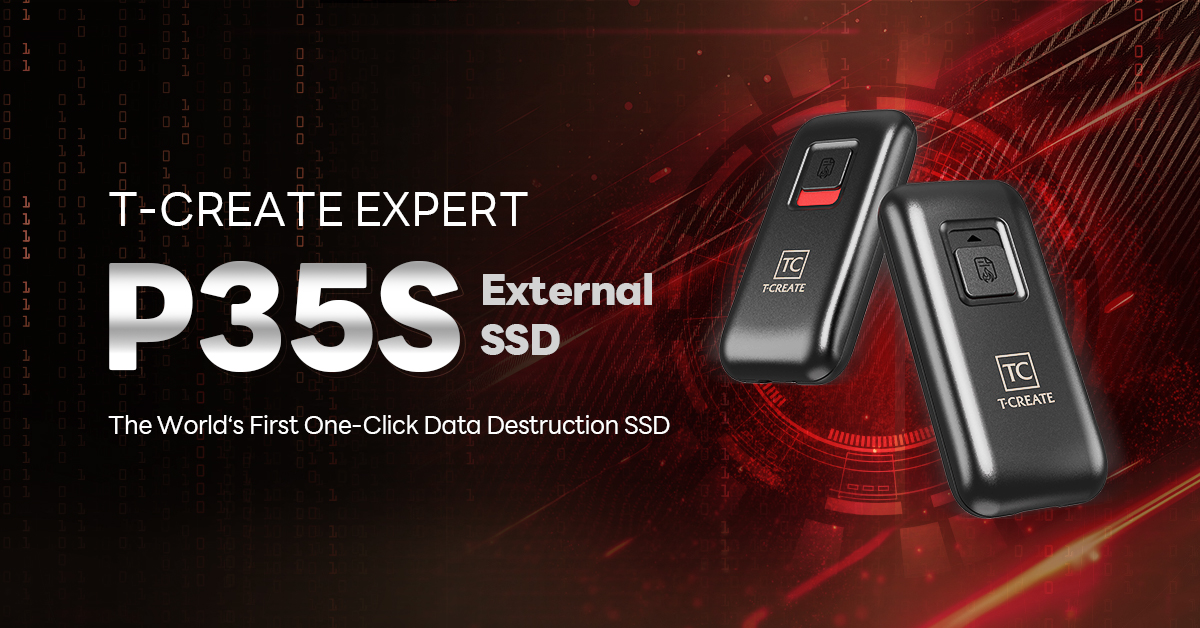
Table of Contents:
- What Is One-Click Data Destruction?
- How the P35S Achieves True Data “Destruction”
- First-Time Setup Guide
What Is One-Click Data Destruction?
The One-Click Data Destruction feature allows users to instantly and irreversibly erase all data stored on the T-CREATE EXPERT P35S External SSD. This ensures information cannot be leaked, stolen, or accessed by unauthorized parties.- Immediate, irreversible data erasure
- Device becomes unusable after destruction
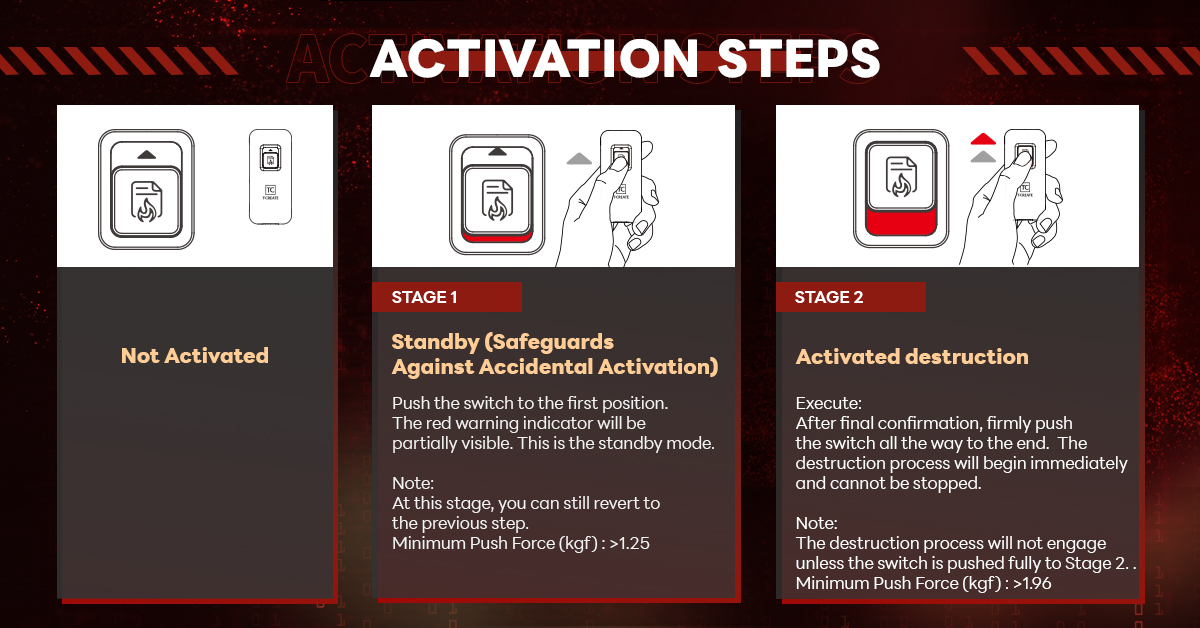
- Dual-Stage Anti-Mistouch Safety Trigger
Users must fully engage the trigger from standby to action, and once the process starts, it cannot be canceled.
How the P35S Achieves True Data “Destruction”
The T-CREATE EXPERT P35S External SSD (One-Click Data Destruction) is the world’s first portable SSD to integrate:✔ Dual-Mode Data Destruction (Software + Hardware)
✔ Dedicated Chip Destruction Circuit
This ensures every bit of data stored in the memory cells is electrically neutralized, making advanced recovery attempts impossible.
It protects users from risks such as device loss, theft, or malicious access to confidential documents.
First-Time Setup Guide
Before using the P35S, follow these steps for optimal performance.Step 1: Connect to Your Computer
Use the included USB-C cable to connect the P35S to a USB 3.2 Gen2 port to achieve maximum transfer speeds.
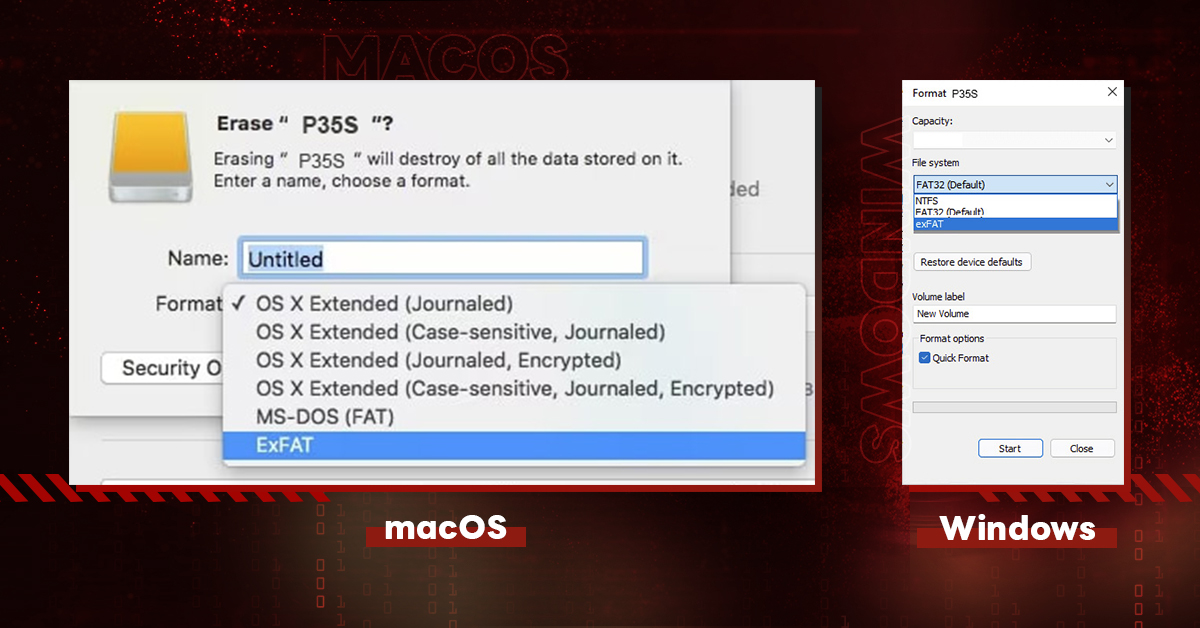
Step 2: Format the SSD (First Use)
Windows
- Open This PC
- Right-click the new drive → Format
- Choose exFAT
- Open Disk Utility
- Select the P35S
- Click Erase → choose exFAT
T-CREATE EXPERT P35S External SSD (One-Click Data Destruction) is engineered for users who prioritize maximum data protection—researchers, content creators, enterprises, and professionals managing high-security workflows.
With its dual-mode destruction design, patented safety mechanism, and hardware-level wipe capabilities, the P35S delivers unmatched data security in an external SSD.
If complete control over your confidential data is essential, the P35S provides a level of protection few portable drives can match.
Designed for advanced security and reliability.
Storage device with one-click destruction function
1. Taiwan Utility Model Patent (Patent No.: M662727)
2. China Utility Model Patent (Patent No.: CN223180653U)
Storage devices with self-destructing function
1. Taiwan Utility Model Patent (Patent No.: M673688)
2. Japan Utility Model Patent (Patent No.: JP3252646U)
RELATED Blog
1
9
22.Jan.2026
A Beginner’s Guide: External vs. Internal SSDs

05.Sep.2025
T-CREATE P34F: The SSD with Apple Find My
24.Jul.2025